
Plans and quotas
Every plan comes with a set of numbers: how many tickets you can take in, how many messages go out to customers, how many people can sign in. This is how those numbers are counted, where to read what you have used, and how to move to a plan that fits better.
How the numbers are counted
There are two kinds of limit, and the app is careful to say which is which, because they read alike on a card. Push notifications are the exception to both: they are counted so you can see them, and never limited.
- A monthly allowance, written "/ month", starts over at the beginning of every month. Emails, WhatsApp messages, tickets and new customers are counted this way.
- A one-time allowance, written "to start", does not refresh. It is what the plan gives your shop in total, and reaching it means moving up a plan.
Where a plan shows a total as well ("up to 1,000 in total"), that total is the most the plan includes ever, counted from the day you opened the shop and never reset. Reaching it means moving up a plan too.
Workflows and staff are places rather than a pace, so they are written as a bare count: this many workflows, this many people who can sign in. Delete a workflow, or pause or remove a team member, and the place comes back for somebody else. Waiting-room screens are places too: your plan sets how many can be linked at once, and both the Usage page and Front desk › Waiting room show how many are in use.
Reading the Usage page
The owner opens it from "Usage" near the foot of the sidebar, just above "Plan & Quotas", or from the chart icon at the top of every page; staff see neither. The page opens on your plan, "Plan: Counter" for example, followed by the day the monthly allowances start over, "Monthly allowances refresh on October 1", whenever something on the page is counted by the month. Under that, one line says how things stand: "Everything is within your plan." when nothing is close; "Running low:" with what is left of anything 80% used, such as "Tickets (8 left)"; and "Used up:" once something has nothing left, followed by "It refreshes on October 1, or move up a plan for more." when every used-up allowance is a monthly one, or "It doesn't refresh: move up a plan for more." when one is not. After a move to a smaller plan, workflows, staff or screens held past the new limit add "Over your plan:" to the line, such as "Over your plan: Staff (3 of 2).". Whenever something is low, used up or over, the line carries one button: "See plans", unless a choice of what to keep is waiting (see Places below). The chart icon follows the allowances alone: it turns amber, with a dot, when the line says "Running low", and red when it says "Used up".
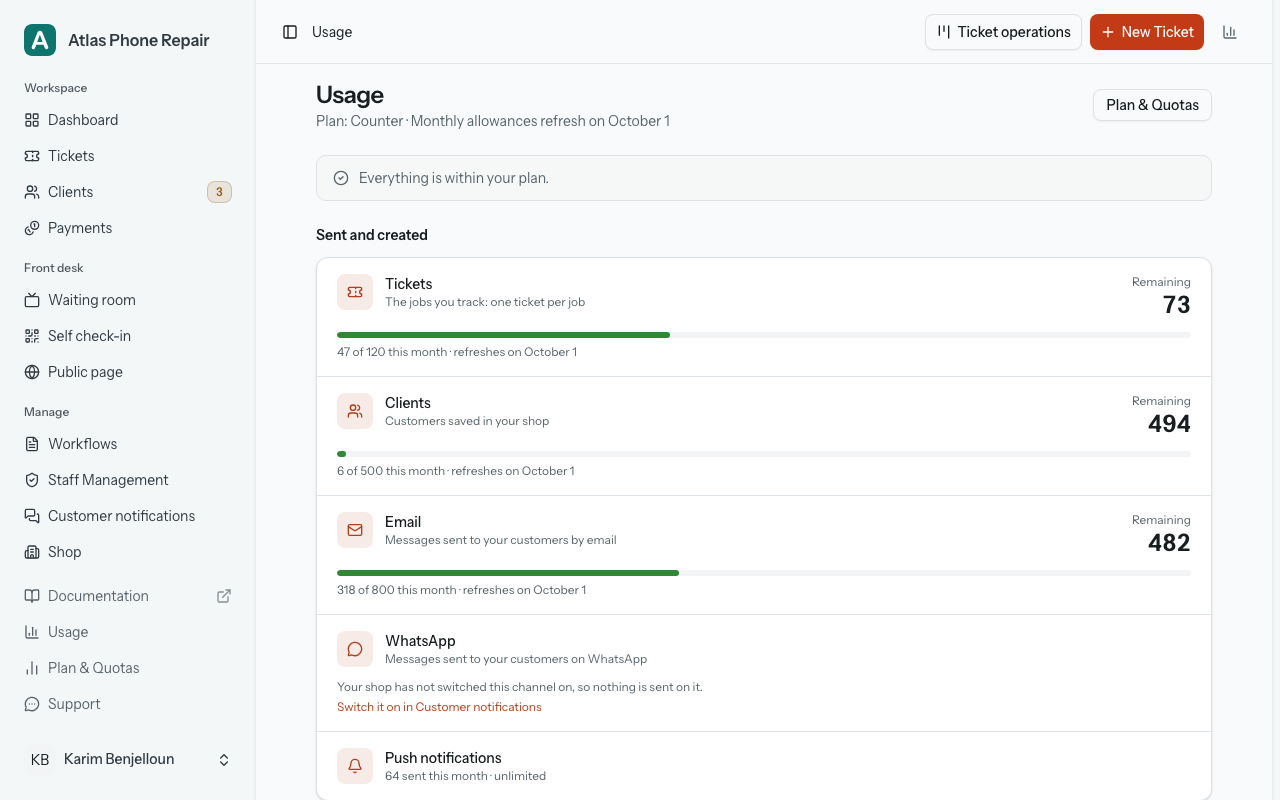
Under "Sent and created", Tickets, Clients, Email and WhatsApp get one row each. The big number under "Remaining" is what you can still use, counted against whichever limit would stop you first, and the bar and the line beneath it are about that same limit, so the line says whether it comes back: "47 of 120 this month · refreshes on October 1" for a monthly allowance, "22 of 30 to start · doesn't refresh" for one that never does. Where the month is what stops you but the plan also has a total, a quieter "Plan total: 318 of 1,000" follows, with an info icon explaining that it counts everything since you joined and never resets. Where support has added to an allowance, the line ends "includes 50 extra". A bar turns amber at 80% and red when nothing is left. Push notifications close the card on plans that include them, with "64 sent this month · unlimited" and no bar.
A row with nothing to count says why instead of drawing an empty bar. A channel your shop has not switched on says so, with "Switch it on in Customer notifications"; something your plan does not include reads "Not in your plan", with "See plans"; and something with no limit simply reads "Unlimited".
Under "Places", Workflows, Staff and Screens are counted as places held at once, not spent: each reads "1 of 2 in use", with a mark for every place (a bar on bigger plans). Each also says how its place comes back: "Delete one and its place comes back." for workflows, "Remove or pause a team member and their place comes back." for staff, and "Unlink a screen in Waiting room › Screens and its place comes back." for screens, a line that takes you there. A row with every place taken is marked "Full", and one holding more than the plan allows, after a move to a smaller plan, "Over your plan". A full set leaves the line at the top alone: it is the ordinary state of a small plan, not something running out. A set held over the plan shows there, as "Over your plan: Staff (3 of 2).", next to "Choose what to keep" while the plan change is waiting for you to choose which workflows and team members to keep, or "See plans" otherwise. Places never change the chart icon.
When an allowance runs out
Nothing fails quietly. The create forms for tickets, clients, staff and workflows each carry a line beside their save button saying what is left: how many this month for tickets and clients (or, on a plan whose tickets are a one-time allowance rather than a monthly one, how many are left on your plan), how many places are free for staff and workflows. When there are none, that line turns into the quota message for that resource ("You have reached your client quota limit." on the clients form, and its equivalent on the others), the button will not submit, and the message carries a link to your plan page rather than ending there.
The ticket form says it earlier still. The panel headed "Who will hear about this ticket" names a spent monthly allowance as one of the reasons a channel is not going to reach the customer, before you save, while you can still do something about it.
A notification with no allowance behind it is not sent and not queued, and the ticket says which channel did not go out. You will not find a message that silently never happened.
Changing plan
Plan & Quotas opens on the plan you are on (its name, and whether that is a paid subscription, an arrangement set up for you by hand, or a trial with days counting down) and then the plans available to you, side by side.
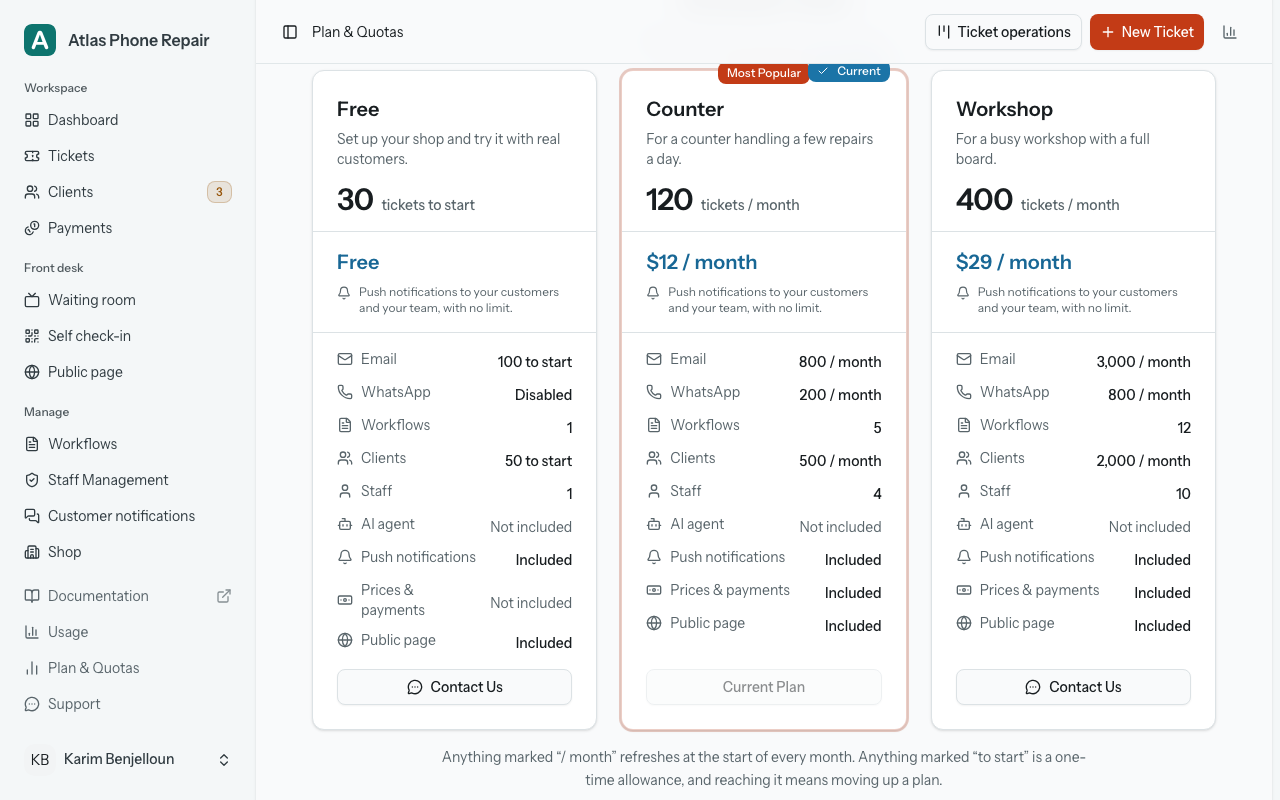
Each card leads with the number a shop recognises itself in: tickets, either per month or as a one-time start. Under the price come the rest of the numbers, one line each, with a total printed under any line that has one. A plan that grants none of something says Disabled on that line, and your current plan is marked as current with its button switched off. Push notifications get their own line, reading Included or Not included, because there is no number to show.
Choosing a plan does one of two things. Most open a checkout in a new tab, and the plan changes once the payment goes through. A plan arranged for you by hand switches over directly instead: a box asks you to confirm, names the plan, and the change takes effect immediately. With a paid subscription already running, "Manage Subscription" takes you out to the billing portal to change a payment method or cancel.
Prices and payments are a row of the same kind: "Prices & payments", reading "Included" or "Not included" on each card. Which plans carry it is read from the plan itself, so this page does not name them. On a plan without it, the owner sees one line on each ticket page, "Prices and payments are part of the paid plans." with "See the plans" beside it, and nothing else anywhere. Moving from a plan that has it to one that does not loses nothing: every price, quote and payment stays on its ticket and in the CSV, read-only, under the line "These records are kept. Adding prices and payments is included in paid plans."; a quote still waiting on a customer is withdrawn and customers stop seeing amounts, until you move back, when everything is as you left it.
Moving to a plan with fewer workflows or staff places than you use never happens by surprise. New tickets stop until you choose what to keep: a chooser ("Choose what to keep on …") preselects your busiest workflows and most-used staff, shows each one's open tickets, lets you reassign them, and pauses whatever you do not keep in the same step as the plan change. Paused workflows can still finish their open tickets, and paused people cannot sign in; nothing is deleted, and "Resume" brings either back once a place is free. Staff see "New tickets can't be created until the owner updates the plan." instead of the chooser.
When a trial ends
A new shop starts on a free trial, and while it runs the plan page counts the days left on it. If it ends with no plan in place, your shop is not locked out: everything stays readable (tickets, customers, workflows, the whole history) but changes are refused. Every control that would change something is greyed out, with "Read-only until the plan is renewed." on hover or keyboard focus, New ticket opens its form read-only, and the plan page says what happened ("Your trial has ended", or "Your {plan} plan ended on {date}") and that your tickets, customers and payments are kept.
Signing out, choosing a plan, opening the billing portal, contacting support and editing your own profile keep working throughout. Nothing is deleted while a shop waits, and choosing a plan puts everything back at once.
If the numbers do not fit your shop
The published plans are not the only arrangement possible. The numbers on a plan can be adjusted for one shop, and where that is on offer both the Usage page and the plan page carry a short note saying so, with the address to write to.
So if you need a shape nobody else asks for (many more messages and fewer people signing in, say, or a season that doubles your intake), ask rather than moving up two plans to reach one number. Support can set your allowances to something that matches the shop.