
Prices and payments
HoopoTrack follows a job from drop-off to pickup. This page is about the money side of that same job, and nothing else: the price, a quote the customer approves, the deposits and payments taken at your counter, the balance until the job reads "Paid in full", the hand-over from the board, the cash count at the end of the day, and a Payments view with a CSV for your accountant. A shop that never enters a price sees the app exactly as before.
What it is, and who sees it
Prices and payments are part of the paid plans, and the plan page says so on a row of its own: "Prices & payments", reading "Included" or "Not included" on each plan. On a plan without it, the owner sees one line on every ticket page, in the place the money would go: "Prices and payments are part of the paid plans." with "See the plans" beside it. Staff see nothing at all, and nothing appears on the intake form, the ticket list, the counter board or the tracking page.
Within your team, money is an ability like the others. The owner always has it. A staff member needs "Handle Payments" ticked on their account before they can set a price, send a quote, or record, cancel or refund a payment; without it they see that a job has a balance due or is paid in full, never how much, and no money control they cannot press. A second, smaller ability, "See Balance Due", sits under it: with that one alone a staff member reads the figure, "Balance due 320 MAD", wherever the chip shows, and still no price, no quote line, no payment and nothing that records. Team and clients covers how the two boxes behave on the staff form.
Every amount is written in your shop's currency, the one set on your shop profile, with its code after the figure: "320 MAD", "1,250.50 MAD", never a bare number. Whole amounts drop their decimals. Once a single payment has been recorded, the currency can no longer be changed from settings; the field says "Your currency can't change once payments are recorded. Contact support if you need to." That rule is what keeps a report from adding two currencies together.
Money never blocks the job. No money field is ever required; a ticket is created, moved, completed and deleted with no price at all, and nothing is held because a balance is unpaid. Money is a side panel on the job, not a stage: it never adds a step to the customer's "Step 2 of 6", never appears on either timeline as a step of its own, and never changes the colour of the stage chip. Where the app has anything to say about money, it says it under the stage, not instead of it.
The whole feature can be switched off for your shop from the Settings tab of the Payments page, and a shop that moves to a plan without it is in the same position. Either way every record it made is kept: read-only, still on the ticket, still in the CSV. Nothing new can be added, a quote still waiting on a customer is withdrawn, and customers stop seeing amounts. Switching it back on, or moving back to a plan that includes it, lets the shop add again; a withdrawn quote stays withdrawn. The ticket page says which case it is in one line above the records. Switched off: "These records are kept. Prices and payments are switched off for your shop, and can be turned back on in Payments › Settings." On a plan without it: "These records are kept. Adding prices and payments is included in paid plans."
A price and a deposit at intake
The intake form gains one collapsed row, "Price (optional)", between the assignee and the description. Closed, it costs the common path nothing. Opened, it is one amount field in your currency. That single figure is how most counters quote, and the form does not make you itemise: "Break it down" is a link that turns the total into lines ("Add a line", each with a label such as "e.g. Labour" and an amount), and "A discount is a line with a minus amount." says how a discount is written. The "Total" is added up for you.
Under the amount, "Customer agreed at the counter" starts unticked. Agreement is something the customer did, so the app never records it by default; ticking it is one tap in the same place, and it turns the price into an agreed quote from the first minute. Left unticked, the price is saved as a draft quote, which you can send for approval later. The customer is never shown a draft.
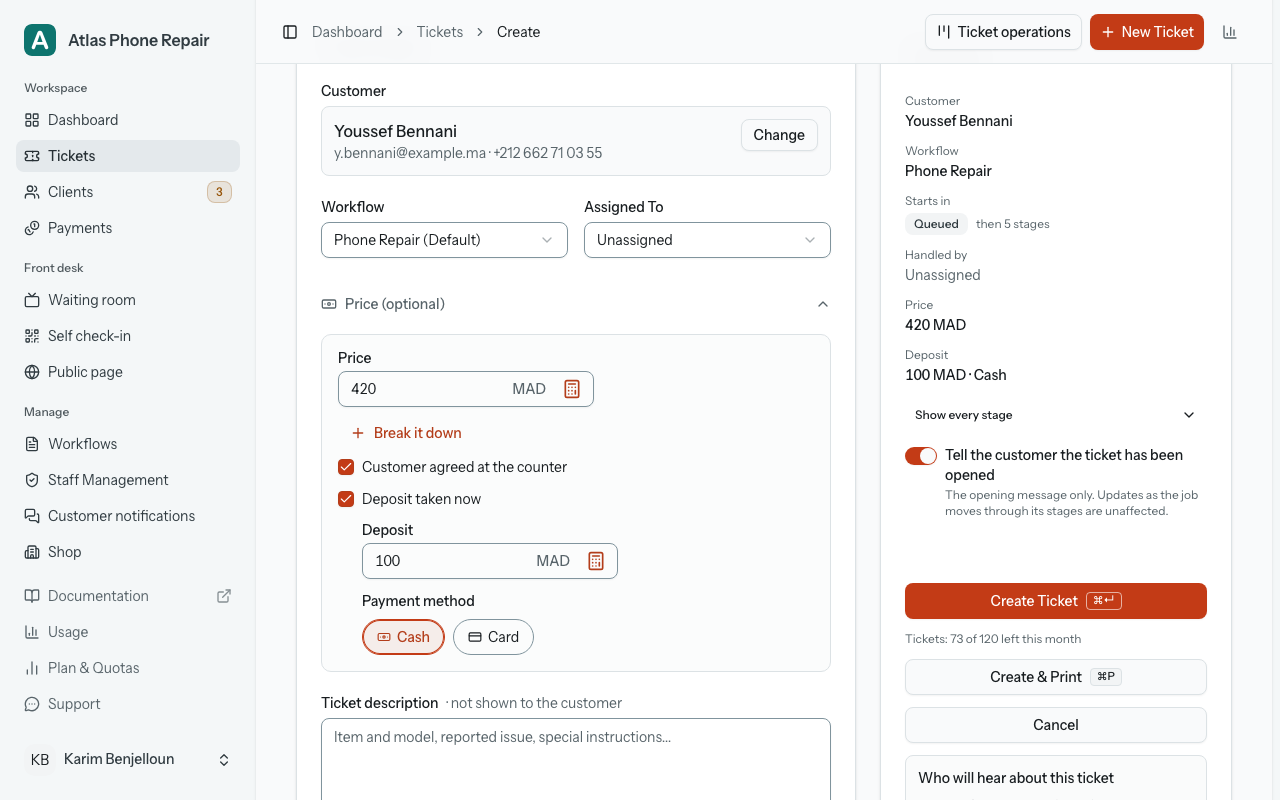
"Deposit taken now" opens an amount and the payment method chips, the same control you will meet again as "Record payment". A deposit is a part-payment: it counts toward the total, and it comes back through Refund if the job does not go ahead. It is recorded as a payment the moment the ticket is saved, and the "This ticket" panel beside the form gains a "Price" row and a "Deposit" row as soon as you type them.
The receipt you hand over at intake prints the deposit either way, as "Deposit received 100 MAD · Cash", because the customer is holding that money's receipt. It prints the price and the balance only when the price was agreed; a draft price prints nothing, since a balance against a figure the customer never agreed to is a demand rather than a record. The row is shown only to people who handle payments; staff without the ability see the form as it always was.
Amounts are typed the way your keyboard writes them: Arabic-Indic digits and either decimal mark are accepted and read correctly. An amount with more decimals than your currency has is refused with a message rather than rounded, so what is recorded is always exactly what was typed.
Quotes
On the ticket page, the money sits in one card, "Price & payments", directly under the ticket details in the side column. Its first row is the answer the counter wants: "Balance due 320 MAD", "Paid in full" or "To refund 50 MAD", with "Record payment" beside it. Under that come the agreed price, marked "Agreed", the quote's status, its lines when there are any, the "Payments" and a "History". The same balance also sits as a chip in the ticket's header, beside the stage badge; on a phone, where the card is a long scroll down, tapping the chip takes you to it. On a ticket with no price, the card is one quiet "Add a price" link and nothing else: no empty figures, no table, no badge.
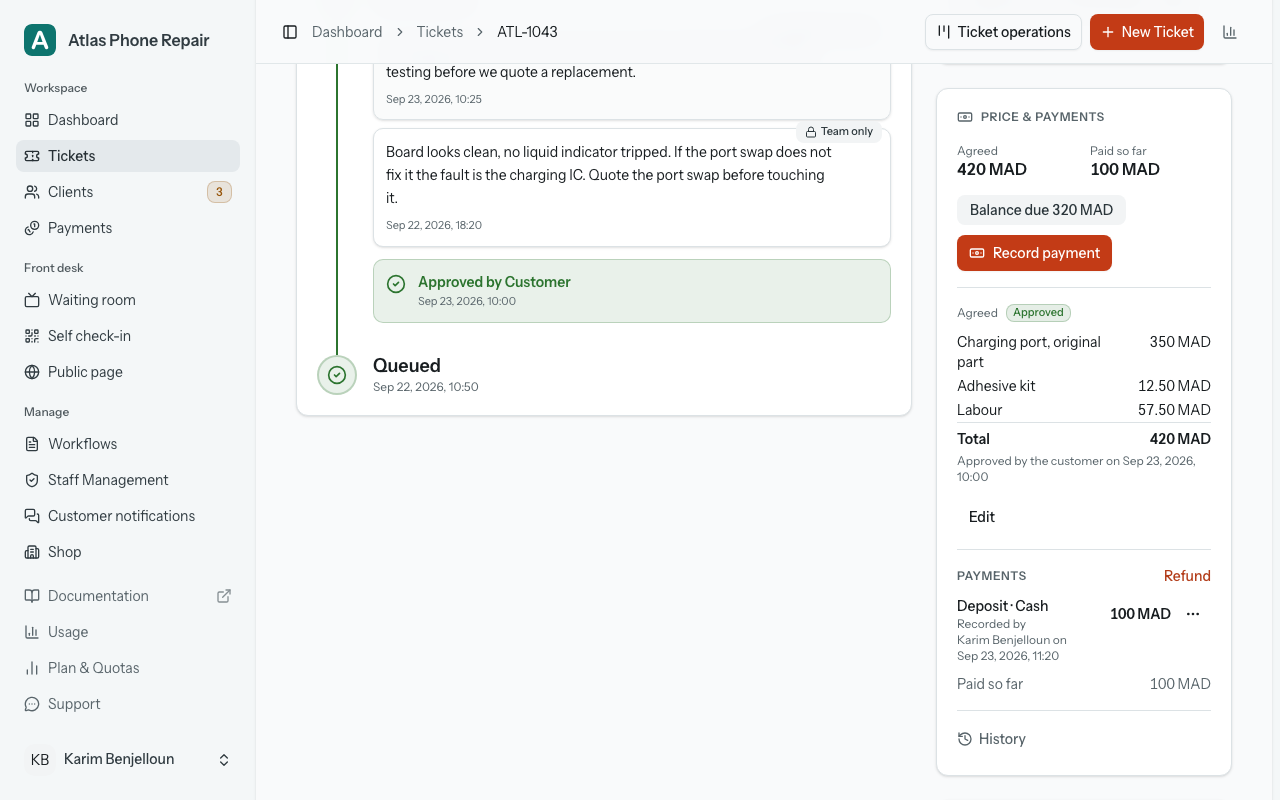
A quote is one of six things, and the card says which: "Draft", "Waiting on customer" once it has been sent, "Approved", "Declined", "Replaced by a newer version" or "Withdrawn". "Waiting on customer" is the same wording the ticket list and the board use for a stage or a question the customer has not answered, so a sent quote shows through that one familiar badge rather than adding a second one. Unlike a question, a sent quote does not hold the job: you can keep moving the ticket while the customer decides.
"Send for approval" opens a dialog built like "Ask the customer": it shows the lines and the total exactly as the customer will see them, lets you choose the channels that can reach this customer, and sends. A quote with no lines needs one line of its own before it can go, "What it covers", because a customer reading a phone was not at the counter to hear it; the dialog says so: "Say what this quote covers, so the customer knows what they are approving." A price agreed in person needs no such line. Untick every channel and the flash is honest about it: "Quote recorded. The customer was not notified. It is on their tracking page." Otherwise: "The quote has been sent to the customer." Sending is not offered on a finished ticket or for an erased customer, for the same reasons a question is not.
Once sent, a quote is frozen: its lines, its total and its "What it covers" line are what the customer approves, and nothing rewrites them afterwards. The customer answers from their tracking page, and the card records it: "Approved by the customer on 12 Oct 14:32", or "Declined by the customer on 12 Oct 09:10" with any note they left, quoted where the answer is. Your shop is emailed the moment either answer arrives. A price agreed across the counter is recorded with a name instead of an answer: "Agreed at the counter, recorded by …", followed by who ticked it and when.
If a stage that asks the customer for approval is open at the same time, the customer does not get two cards about one decision. The quote card carries the stage's question under the lines, and one "Approve" or "Decline" is recorded on both, so the stage is released and the quote agreed by the same tap. The Send dialog tells you before you send that the customer will answer both together.
A price change after the customer agreed is a new question, never an edit. "Edit" on a sent or agreed quote creates a new version, shown to you as you compose it and to the customer as they answer it with the old figure beside the new one: "Was 350 MAD, now 420 MAD". Until that version is sent and approved, or agreed at the counter, the earlier amount stands: it stays marked "Agreed", the new one sits beside it as "New quote, not agreed yet", and the balance is counted from the agreed one. Anyone who handles payments may do this, and only this way; nobody edits an agreed quote in place, the owner included. A discount at pickup takes the same path, agreed in person.
The "History" is the answer to "you said 350": one chronological list of every quote version, payment, cancellation and refund, oldest at the bottom, each with who and when, and version lines such as "v2 · Approved · 420 MAD" and "v1 · Replaced by a newer version · 350 MAD". It opens by itself as soon as there is more than one version, so the answer is not behind a tap exactly when it is needed. Payments undone within seconds of being recorded fold into one quiet "1 undone" line rather than cluttering it.
The balance is computed, never typed: the agreed total, less payments, plus refunds, with cancelled rows left out. No screen has a "balance" or "amount paid" field, and nobody can type "Paid in full"; it appears when the arithmetic says so. While nothing is agreed yet, you see a balance against the draft, labelled "Against a quote the customer has not agreed yet", and the customer sees no balance at all. When a lower price is agreed after the full amount was paid, the balance goes the other way and reads "To refund 50 MAD", in the warning tone, with "Refund" beside it.
Recording a payment
"Record payment" opens a sheet from the bottom on a phone and a dialog in the middle of a wide screen. "Amount received" is prefilled with the balance, and the first of your accepted payment methods is already selected, so the common case is two taps: open, confirm. The confirm button carries the figure it is about to record, "Record 320 MAD", so a mistyped amount is read before it is kept.
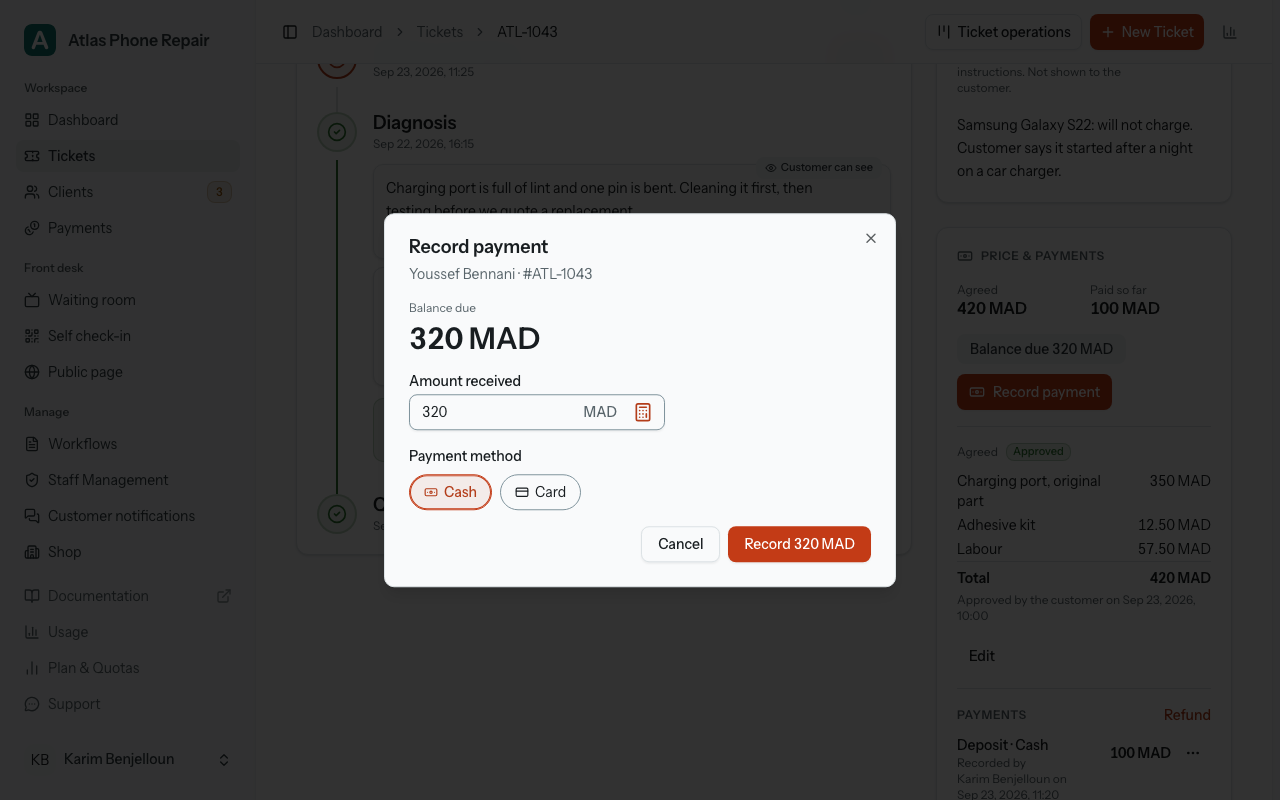
The "Payment method" chips are the methods your shop accepts, in a fixed order with "Cash" first: "Cash", "Card", "Bank transfer", "Mobile wallet" and "Other", which asks "What was it?" and needs an answer. Which of the five appear is set in Payments › Settings; a shop that accepts one method sees no chips, only its name. The order is fixed on purpose: the method decides what the drawer should hold at the end of the day, and a "Card" left selected from the previous customer would quietly move a cash payment out of the count.
Type less than the balance and the sheet says what will remain: "120 MAD will still be due." Type more and it warns without stopping you: "That is more than the balance due of 320 MAD. The extra 30 MAD will show as to refund." An overpayment is rare but real; the usual cause is the cash tendered typed in place of the price, which is why the button repeats the figure. An empty field disables the button, with "Enter the amount received." underneath.
After you confirm, a message reads "Payment of 320 MAD recorded." with two buttons: "Undo", for ten seconds, and "Print receipt". Undo does not delete the payment. The row stays in the history, folded into "1 undone" with the line "Undone right after it was recorded", and it is left out of every total and of the drawer count. A payment deleted outright could already be on a printed receipt or on the customer's page, so the record keeps it and says what happened. Undo belongs to whoever recorded the payment; anyone else corrects it the slower way described next.
After the ten seconds, a payment is corrected in the open. "Cancel this payment", on the row itself, asks "Why cancel it?" and needs an answer; the row is then struck through, reads "Cancelled by …" with the name and the reason, and stops counting. A payment a closed day has already counted refuses this: "This payment is in a day you've already closed. Record a refund instead: it goes into the day that's open now.", with "Record a refund" opening the refund form prefilled with its amount and method; reopening that close, the owner's to do, makes it cancellable again. Money given back is a "Refund": a row of its own with a method and a note, which never edits the original payment and cannot exceed what was paid on the ticket. Every row, whatever its kind ("Deposit", "Payment" or "Refund"), carries "Recorded by …" with the name and the time, and never appears without it. Nothing reads as paid unless a person recorded it.
"Print receipt" opens the 80mm "Payment receipt" in a new tab: your shop, the ticket number, the date on your shop's clock, the "Amount", the "Method", "Recorded on 14 Oct 17:38" and, under "After this payment", the balance that remains. A customer's paper never carries a staff name. Printing does not end the Undo window, but an Undo pressed after the receipt is out asks first: "The receipt is already printed" and "Undo cancels this payment. Ask the customer for the receipt back.", with "Undo anyway" and "Keep it". A cancelled payment's receipt, if reprinted, has "CANCELLED" across it. The ticket's own receipts change too; Printing, on the Tickets page, says how.
Most payments happen when the customer comes back, so that is where the balance waits. Moving a ticket into its ready-to-collect stage shows no prompt: that move is made at the bench, the customer is not there, and the ready message carries the balance instead. The finished ticket's card then leads with "Balance due 320 MAD" and "Record payment", above the rating. Hand over, and a move into a done stage after the pickup one (a "Collected" or "Delivered" stage), asks first instead whenever the ticket is not settled: "320 MAD is still due.", "50 MAD to refund.", or "A quote is still waiting for an answer.", each with the matching action beside "Hand over anyway"; someone who cannot record a payment sees no figure, only "This ticket isn't settled yet." The prompt is never shown on the counter board's one-tap advance for an ordinary move.
A staff member without "Handle Payments" reads the chip without a figure and, where the card would be, one sentence: "Balance due. Someone who handles payments can record it." It states the fact without sending a lone counter worker to find a colleague who may not exist. With "See Balance Due" the figure comes back on the chip, and nothing else does.
Hand over on the counter board
The counter board now shows your ready-to-collect stage by default, as the Ready lane, on every plan. A done stage after it, and tickets already handed over, stay behind "Include completed tickets". Every card in the Ready lane carries one primary action where the advance sits on other cards. On a card with nothing to pay, it is "Hand over", one tap with the board's usual four-second Undo. On a card with a balance due, it is "Record payment & hand over", and the card carries the balance chip. The chip appears in the Ready lane only, where a customer is being handed a job; in-progress columns never carry one, and a paid card carries none.
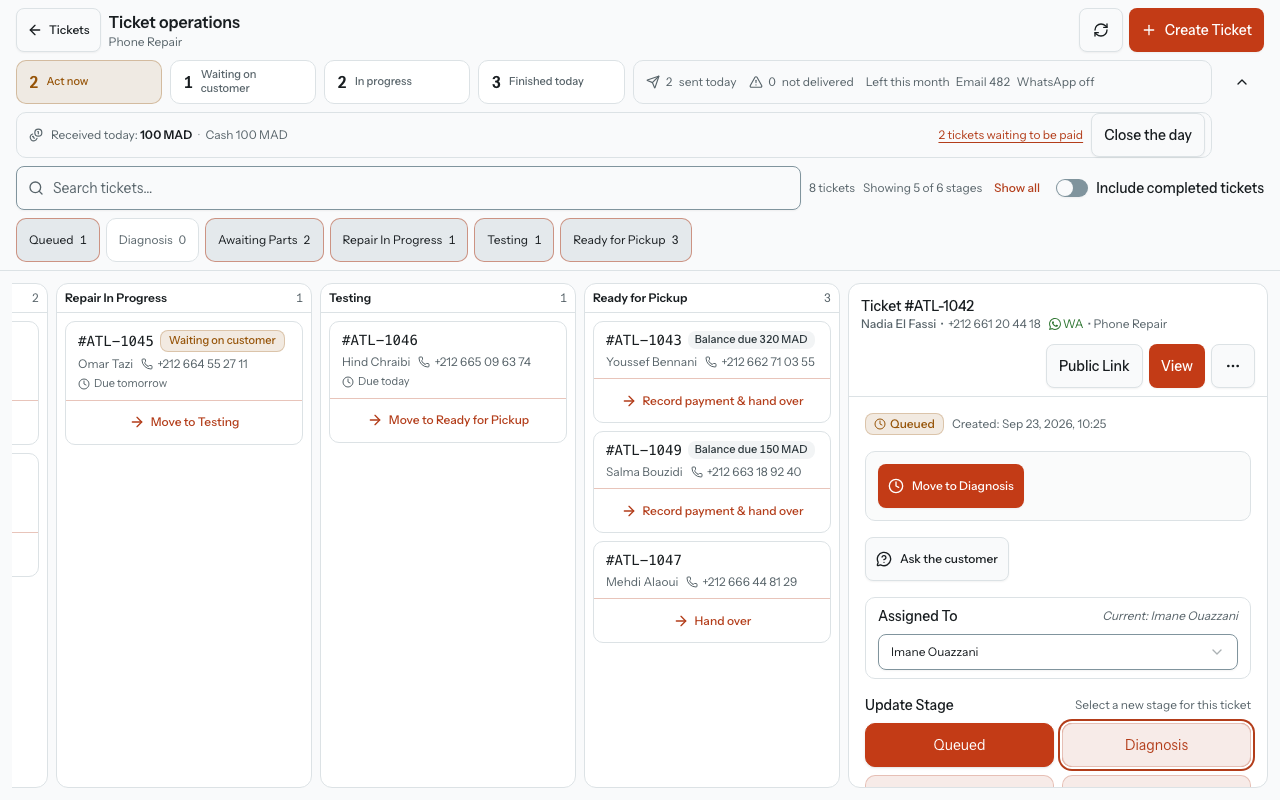
Handing over means one of two things, and the app picks the right one for your workflow. Where the workflow has a done stage after the pickup one, handing over is the move into it, and that stage's messages go out as they do for any move. Where it has none, which is true of every built-in template, the ticket stays in its stage and is simply stamped as handed over, and no message is sent. Either way the card leaves the Ready lane, and the finished ticket reads "Handed over …" with the date and the name of whoever handed it over. Jobs finished before this feature existed count as handed over from the day they were completed and read "Handed over 3 Mar 16:40", with no name.
"Record payment & hand over" opens a sheet headed "Hand over ticket T-1042": the customer, the ticket, and the balance in large type, then the same "Amount received" field and method chips as "Record payment". Its main button carries the figure, "Record 320 MAD & hand over", and does both in one request. Under it, "Record payment only" takes the money without moving the job, and "Hand over without payment" is a text button with its cost printed beneath it: "The balance stays due." Handing over an unpaid job is never one blind tap, and it is never refused either; the ticket then counts among those waiting to be paid.
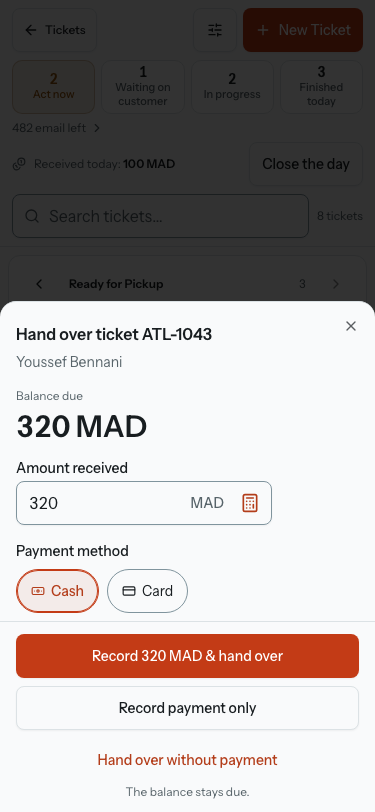
Who gets which button follows the two abilities. Someone with "Handle Payments" and "Update Stages" gets the sheet above. Someone who can move tickets but not handle payments gets "Hand over", which on a card with a balance opens the sheet in a read-only form: "Balance due" (with the figure if they hold "See Balance Due"), the line "Balance due. Someone who handles payments can record it.", and one action, "Hand over without payment". Someone who handles payments but cannot move tickets gets "Record payment", which records and moves nothing. Someone with neither gets no button, as today.
The combined action posts at once, and its message reads "Payment of 320 MAD recorded. Moving to Collected." with the same line the board always adds about what will be sent, then "Undo" and "Print receipt", for ten seconds. Those ten seconds are honest because the messages the hand-over triggers are held on the server for the window and go out when it closes; within it nothing has been sent. Undo cancels the payment (the row stays, folded into "1 undone"), drops the held messages, and puts the card back in the Ready lane as if it never moved: "The payment is cancelled and ticket T-1042 is back in Ready for pickup." Where the hand-over was a stamp with no move, the message reads "Payment of 320 MAD recorded. Handing over ticket T-1042." and there is no line about sending, because nothing is.
Two edges are worth knowing. If "Print receipt" was pressed, Undo asks first, with "The ticket goes back to Ready for pickup." added to the question, because the customer may already be holding the paper. And if the server refuses the Undo (the connection dropped, or the window had closed on the way), the card does not come back: the message says "Could not undo. The payment and the hand-over stand. Cancel the payment from the ticket." A card that looks undone over a payment that stands would be the worst outcome here. After the window, a payment is cancelled with a reason from the ticket's card, and the ticket is moved back like any ticket.
A hand-over can be undone on its own, later, from the finished ticket's card: "Undo hand-over", beside the "Handed over" line, for anyone who can update stages, on every plan. It clears the stamp (or moves a ticket that went into a later done stage back into the ready one), puts the ticket back in the Ready lane, and sends the customer nothing either way: nobody is told a second time that the job is ready, and nobody is told it was undone. The payment is not touched. If one was recorded in the same hand-over, the button asks first, "The payment stays recorded. Cancel it separately if needed.", and cancelling it stays the card's own act with its reason. The message reads "Hand-over undone. Ticket T-1042 is back in Ready for pickup."
Moving a handed-over ticket back into its ready stage by any other route clears the stamp too, and that move sends the ready stage's messages as any move does, which is the difference from "Undo hand-over". The earlier hand-over is not erased either way: the ticket's stage history keeps it as a line under the stage where it happened, "Handed over … · undone by …" naming who undid it, or "Handed over … · undone by moving back to Ready for pickup", so when a customer says "I already collected it", the answer is on the page. Nothing of it reaches the tracking page.
The strip along the top of the board gains today's money, on your shop's clock. The owner reads "Received today: 2,050 MAD", net of refunds, with cash in it. Staff, those who handle payments included, read "Received today, other than cash: 800 MAD", and in the strip's dialog one row per non-cash method with an amount, then "Cash: counted at closing" in cash's place. The running cash total is kept from staff on purpose, so that the count at the end of the day means something; it reaches them through that count. The dialog, headed "Today's payments", also carries "3 tickets waiting to be paid", which opens your ticket list filtered to finished jobs with a balance, the last close, and "Close the day". A day with nothing received leaves the figure off rather than printing a zero.
Close the day
"Close the day" answers one question: is the cash in the drawer what the app says you took? It is for whoever handles payments, the owner included, since the person who records the cash is the person who counts it. Reopening a closed day is the owner's alone. There is one drawer per shop, and nothing nags you to count it: a shop that never closes a day sees only the button.
The period is not the calendar day. It runs from the previous close (or the first payment ever) until now, and the sheet says so on its first line, "Since Fri 19:42", so a late pickup recorded after tonight's count belongs to the next one rather than going missing from this one. A second close on the same evening is normal.
The count is blind. The sheet opens on one field, "Cash counted", and one button, "Compare", and nothing else: before you press Compare, the expected amount is not sent to the page at all, so nobody counts towards a figure they have already seen. Compare sends your count, and the server answers with the verdict, in words and never as a bare signed number: "The drawer matches", "Short by 20 MAD" or "Over by 20 MAD". Short and over are both shown in the warning tone, because an over is a discrepancy too. The owner, who reads the running cash figure on the board all day, is the one person whose count is not blind, and the sheet is the same for everyone so the record never depends on who counted.
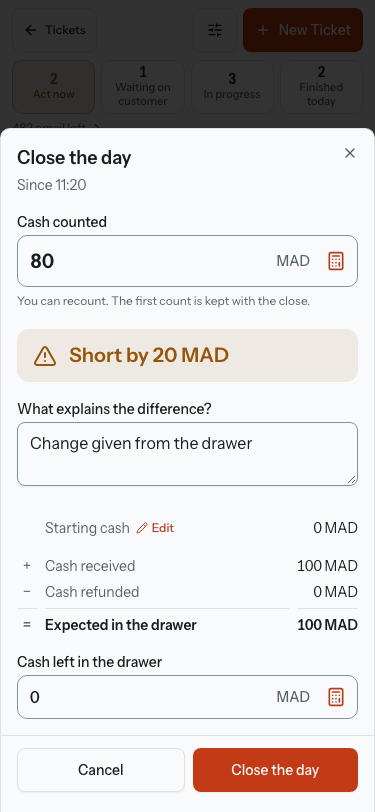
Under the verdict, when it is not a match, comes "What explains the difference?", and the day cannot be closed until it is answered. Then the sum, laid out as a column the eye can add: "Starting cash", plus "Cash received", less "Cash refunded", equals "Expected in the drawer". Starting cash is carried from the last close and can be edited here; an edit is recorded with who made it, because it moves the expected figure. "Cash left in the drawer" defaults to the starting cash and becomes the next period's starting figure; more than you counted is refused with "More than you counted." Last, "Not in the drawer" lists, for information, the card, transfer, mobile-wallet and other totals of the period, one row per method that has an amount and no zero rows, with refunds shown as "Card, refunded".
You can recount after Compare. The field stays editable, and the verdict, the sum and the limit on cash left follow the new figure without a second Compare; the line under the field says "You can recount. The first count is kept with the close." The close records both figures: the first count, sent with the first Compare and held on the server from that moment, which is the honest signal, and the final one, which the difference, the note and the next starting cash use. The Payments view prints "First count 1,450 MAD" under a close only when the two differ.
Saving makes a record that is never edited: who closed, when, the period, each figure and the note. The board then reads "Day closed at 19:42 by …" with the name, and the entry stays for the next period. A payment a closed day has already counted can no longer be cancelled at all: Recording a payment covers the refusal and the refund it points to instead. Money that went back to a customer is a refund, and a refund is always in the arithmetic, landing in the day that is open when it is recorded.
The owner can reopen the latest close only, since reopening an earlier one would re-cut the periods of every close after it. "Reopen this close" asks "Why reopen it?" and says what follows: "This close stays listed. The next close covers its period again." Reopening never overwrites: the first close stays in the list, struck through, with "Reopened by …" and the reason under it, and a new close follows. If two people close at once, the second save is refused with a line naming who "closed the day at 19:42." and the sheet reloads with that close. Nothing here is silent.
You can close the day from two places. The button sits in the strip along the top of the board and also in the "Today" block of the Payments page, for the same people. On a phone the board's money row always has a full-size "Close the day" button; once today is closed and there is no cash left to count, it becomes a "Closed at 19:42" chip that opens the record. If the count covers a period that began before today, the sheet says so: "Not closed since then, so this count can differ from “Received today”, which starts at midnight." It also says when cash payments or refunds on deleted tickets were left out of what it expects in the drawer.
The Payments view and the CSV
"Payments" appears in the sidebar, after Clients, from the shop's first money record, and the owner alone can open it. It is laid out to answer "who owes me what" first and "does the drawer match" second.
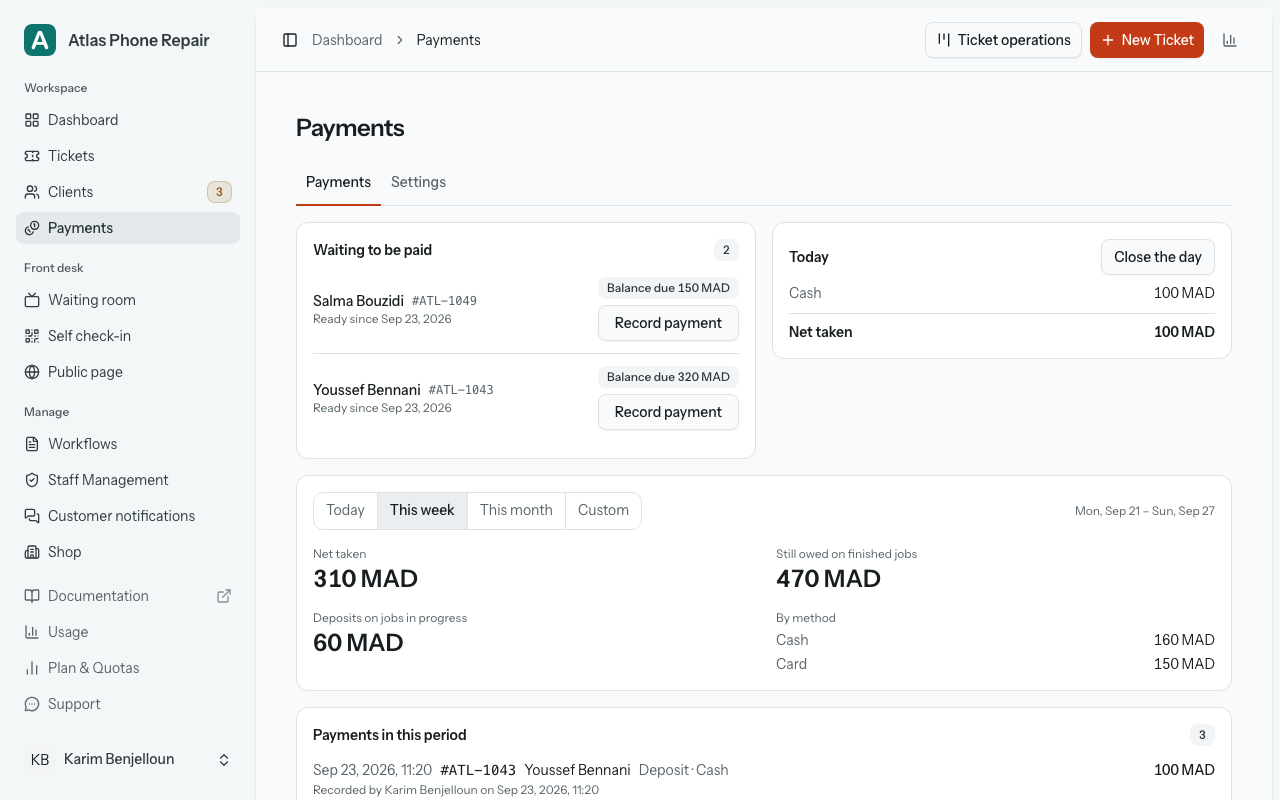
At the top, "Waiting to be paid": the finished jobs with a balance, oldest first, each with the customer, the amount, "Ready since 12 Oct" and "Record payment" inline. Then "Today": the total by method, cash first, so the drawer can be counted, and "Last close: Fri 19:42 · The drawer matches".
Below them, a period picker on your shop's clock ("Today", "This week", "This month", "Custom"), and for the period: "By method", "Net taken" (payments less refunds, cancelled rows left out), "Still owed on finished jobs", "Deposits on jobs in progress", the list headed "Payments in this period", where cancellations are struck through and refunds are listed with who made them, and the "Day closes" of the period with their verdicts. A period with nothing in it says "No payments recorded in this period." A shop that has never recorded a payment reads one sentence and no zeroes: "No payments recorded yet. They appear here when you record one on a ticket."
"Export CSV" is the accountant's file, and the line under it says what is in it: "One row per payment, refund and cancellation in the period: date, ticket, customer, method, amount and who recorded it." Cancelled rows are included with their reason, amounts carry the currency code, and a method you have since stopped accepting still appears on the payments recorded with it.
What the customer sees
A quote to approve is a question, so it takes the place questions already have on the tracking page: the browser tab and the band across the top say "Action needed", and the card sits directly under the band, before the timeline. It is headed "Your shop sent you a quote", with "Sent by" followed by your shop's name and the date (the shop, never a staff member), the line "Waiting for your approval before the work goes ahead.", the lines and total exactly as you sent them, or the "What it covers" line for a single figure, and for a changed price "Was 350 MAD, now 420 MAD" above them. The buttons are "Approve 420 MAD" and "Decline", with "Want to tell the shop why? (optional)". Either one opens the same confirmation the page uses for a question, "Approve this quote for 420 MAD?", quoting the lines, so nobody agrees to a sentence they have stopped reading.
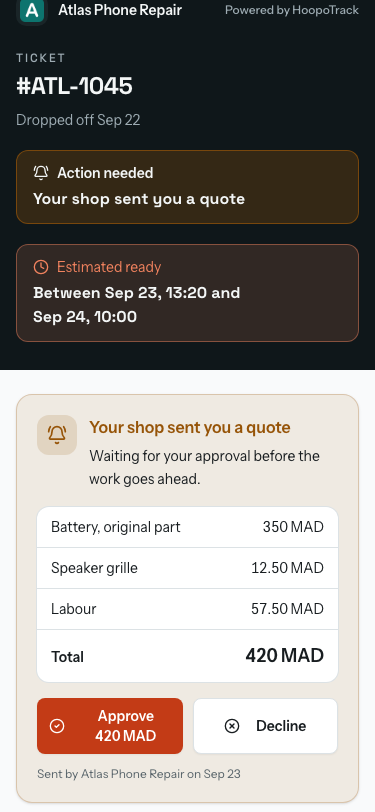
After an answer the card folds into the list of answered questions, as "You approved this quote on 12 Oct." or "You declined this quote. The shop will get back to you.", with the lines kept as the customer's record of what they agreed. The page refreshes itself every 30 seconds, and an answer to a quote you withdrew or replaced while the customer was reading it is refused rather than recorded against the old version: "The shop changed this quote. Here is the new one." Once the job is handed over, the quote stops being something to answer at all: the card no longer appears on a handed-over ticket's tracking page, and an old Approve or Decline link is refused with "This job is already finished, so this can no longer be answered here. Contact the shop if you need to." Reopening the ticket brings the card, and the ability to answer, back.
Below the questions and above the timeline, one quiet line sums up the money: "Quote 420 MAD · Paid 100 MAD · Balance due 320 MAD". It appears only when "Show prices to customers" is on in Payments › Settings and a price has been sent or agreed. While the quote is only sent, or was declined, the line carries the deposit and no balance, "Quote 420 MAD · Paid so far 100 MAD", because a balance against a figure the customer never agreed to is a demand. At zero it reads "Paid in full." and nothing more. When the job is ready to collect, the balance also joins the band at the top, under your address: "Balance due at pickup: 320 MAD", which is the moment the customer needs it. On a PIN-protected ticket all of this waits behind the PIN, like everything else on the page.
Nothing on the page asks the customer to pay. There is no pay button, no card logo and nothing that takes money: "Paid so far" is your shop's record of what was received at the counter, shown back to the customer. A quote you send is always shown to them, whatever the "Show prices to customers" switch says; that switch governs what appears without anyone choosing it: the payments line, the balance in the ready message, and the amounts on customer receipts.
The messages carry the figure but never the lines; those are on the page. Sending a quote emails the customer "Your quote for ticket T-1042: 420 MAD" with the line "Please approve or decline it on your ticket's page." and a button that opens it, and messages them on WhatsApp where that reaches them, over a template Meta has approved. On a PIN-protected ticket no message carries an amount: the subject is "A quote for ticket T-1042", because an email subject or a lock-screen preview would go around the PIN. The ready-to-collect message gains one line, "Balance due: 320 MAD.", only when prices are shown to customers, the balance is above zero, the amount was agreed and the ticket has no PIN. Notifications covers how these messages are chosen and how you see whether they arrived.
On paper, the customer's 80mm receipt and the tear-off half of the A4 sheet print "Quote", "Paid" and "Balance due" lines under the same two conditions, prices shown to customers and an amount agreed or a payment made; a draft price prints nothing. The payment receipt is described under Recording a payment. Anonymizing a customer removes their identity as it always did and keeps the amounts, which are your shop's bookkeeping rather than the customer's personal data.
What is recorded, and what is not
HoopoTrack records payments; it doesn't take them, and it doesn't issue tax invoices. Every printed receipt that carries an amount says so in one line, and the paperwork for tax stays with the tool you already use for it. Nothing here connects to a card terminal, a bank or an online payment service, and no customer is ever offered a way to pay through HoopoTrack.
Records are never silently rewritten. A cancellation and a refund are new facts added to the history, with a reason and a name; the audit log keeps every money change with who made it, and a change to what a customer is shown is always attributed on the row itself, not only in the log. Deleting a ticket that has payments is the owner's to do, and the dialog says how much those payments total and that deleting removes them from your totals; the ticket sits in Deleted tickets for the usual window, and restoring it brings its payments back with it. Deleted for good, a ticket takes none of its payments with it: they stay in the Payments view and the CSV, labelled like "T-1042 (deleted) · Karim", and any closed day stays as it was.
The privacy policy says the same: the prices, payments and payment methods a shop records on its tickets are stored for that shop's own bookkeeping, and HoopoTrack does not take or process any payment. The platform's administration tools show no shop's money. HoopoTrack's support team sees it only by signing in to your account, as it does to help you with a problem; it cannot export it from there, and anything changed that way is recorded.